ARCHIVESITESCANNER / BROWSER EXTENSION
Archivum.
I built Archivum to explore a website’s archived URLs from the browser. Query the Wayback Machine’s index, follow its folder structure, search URL text, and export what you find.
- Chrome / Chromium
- Manifest V3
- HTML · CSS · JavaScript
- MIT license
Independent project. Not affiliated with, sponsored by, partnered with, or endorsed by Internet Archive.
01 / CAPABILITIES
Explore what the archive knows.
Query a hostname
Look up the active website in the Wayback Machine’s CDX index. Optional date and archived HTTP-status filters help narrow the results.
Browse as folders
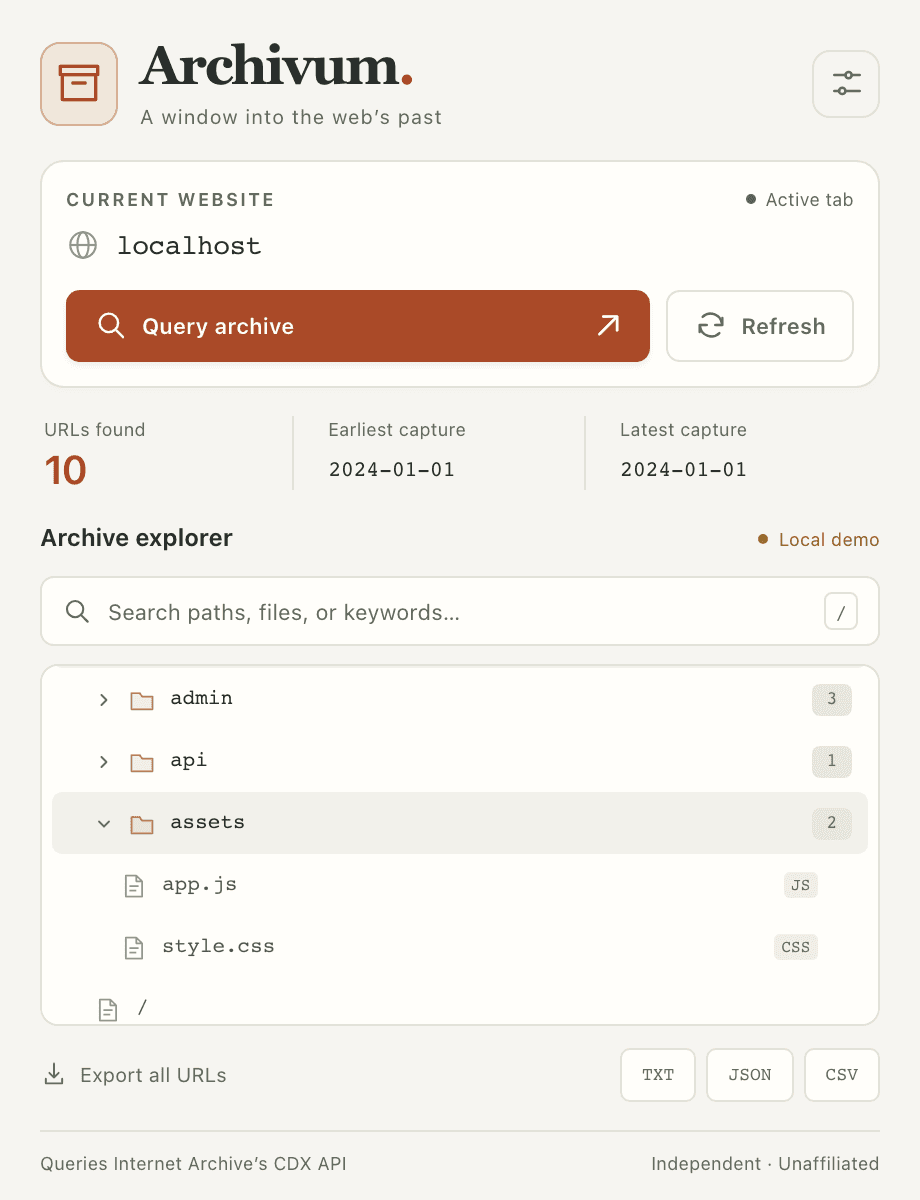
Explore a collapsible tree of paths and files, with directory landing pages and URL variants retained when returned by the API.
Search URL text
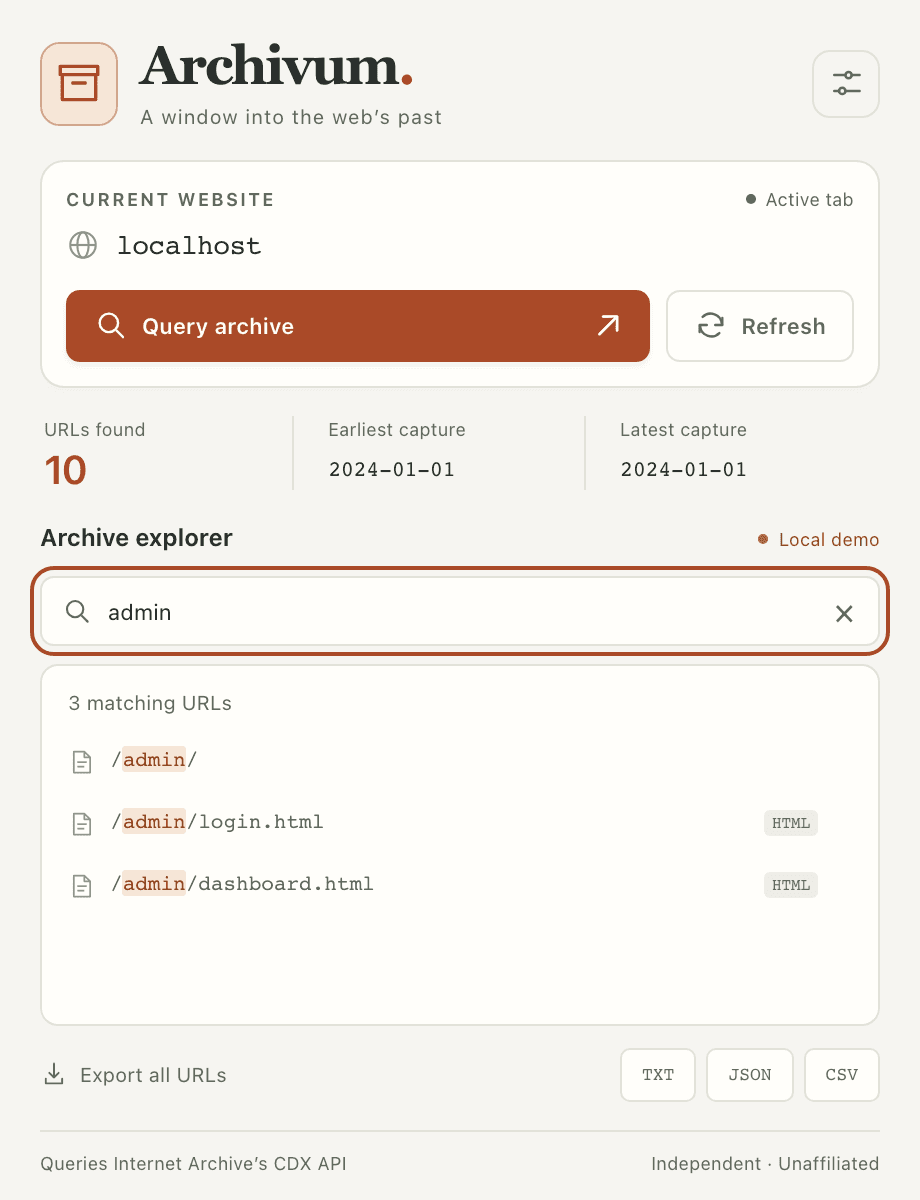
Find paths, filenames, extensions, hostnames, and query strings. Search runs locally against loaded results, with matching text highlighted.
Export your findings
Save the full returned result set as TXT, JSON, or CSV. JSON and CSV include URL, timestamp, status, and MIME type. Search does not narrow the export.
Reuse recent results
Matching results are cached locally for 30 minutes. Refresh bypasses the cache; a normal query reuses a valid entry when available.
Work from the keyboard
Press / to focus search and Esc to clear a focused search or close options. Folder controls support the keyboard, with visible focus and reduced-motion support.
02 / IN THE EXTENSION
Browse. Search. Export.
Actual extension screenshots using its built-in Local demo. These URLs and capture dates are synthetic examples.
03 / GET STARTED
Install in Chrome.
Archivum loads as an unpacked extension. There is no build step or account to create.
- Get the repository. Open ArchiveSiteScanner on GitHub, choose Code → Download ZIP, and extract it. You can also clone it with the command below.
- Open the extension manager. Enter
chrome://extensionsin Chrome’s address bar and enable Developer mode. - Load Archivum. Choose Load unpacked and select the extracted repository folder containing
manifest.json. - Choose a website. Open an HTTP or HTTPS website, then open Archivum from the extensions menu. Pin it to the toolbar if you want quick access.
git clone https://github.com/saazwho/ArchiveSiteScanner.gitOther Chromium browsers with unpacked-extension support use a similar installation process. Firefox and Safari compatibility has not been verified. After updating the files, reload the extension in the extension manager and reopen its popup.
04 / FIRST QUERY
From a hostname to useful records.
- Check Current website. Archivum queries the active tab’s hostname. The tab’s current path and query string are not used.
- Set optional filters. Use the sliders button to choose 100–50,000 results (default 5,000), optional dates in
YYYYMMDDformat, and whether to include only archived HTTP 200 responses (on by default). - Select Query archive. Expand folders or search loaded URL text. Keep the popup open until the query completes. Refresh requests fresh results from the API.
- Export the full result set. Choose TXT for a URL list, or JSON/CSV for records with metadata. Review exports for sensitive information before sharing them.
Result links open the original website.
Clicking a result opens its original URL in a new tab and may contact that website. It does not open a historical Wayback snapshot. An indexed URL may no longer exist, and archive visibility does not grant permission to test or access it.
For a no-request demonstration, open a page on localhost or 127.0.0.1 and choose Query archive. Archivum uses ten fixed sample URLs and labels the results Local demo.
05 / REQUESTS & PERMISSIONS
Where the data goes.
A cache miss or explicit refresh sends one HTTPS GET request directly to Internet Archive’s public CDX endpoint. It queries indexed URLs; it does not crawl the target, retrieve page bodies, or submit pages for archiving.
https://web.archive.org/cdx/search/cdxArchivum has no developer-operated backend, analytics, telemetry, or background browsing-history collection. Local searches and exports make no API requests. Exports remain on your device until deleted; treat them and cached URLs as potentially sensitive.
Read the results in context.
Results are limited and collapsed by URL. Capture-date statistics describe the returned records, not a complete site history or each URL’s latest capture. Subdomains are not automatically enumerated. Requests time out after 45 seconds, with no automatic retries or pagination beyond the chosen limit.